1. The phone rings
You get first go
Your mobile or landline stays on the website and the van. Let it ring a few times. If you pick up, the receptionist stays out of it.
An Australian AI receptionist
We set up and look after an Australian AI receptionist behind the number you already use. It's not a person in a call centre, and we won't pretend it is. It talks in a natural Aussie voice, sticks to a script you approve, and takes down the useful details when you can't get to the phone. Your website and the answering go on one Buckram invoice, so there's no second checkout for the phone.
Ring our sample plumber: 0485 056 5301. The phone rings
Your mobile or landline stays on the website and the van. Let it ring a few times. If you pick up, the receptionist stays out of it.
2. Nobody picks up
A simple divert sends the missed call to the AI. Customers don't need a new number. After hours, you can send every call there if you want.
3. It takes the useful bits
It answers with your business name and handles everyday questions from a list you've signed off. It won't quote a price unless you've given it the numbers.
4. The job lands with you
You get a text or email with the name, the number and a short write-up. On the operations package that conversation can open a job in ServiceM8, Tradify, simPRO or a calendar.
5. Nights and weekends
No roster to fill. If two people ring at once, both get answered.
6. What it will not do
If someone smells gas or has a medical emergency, it sends them to the right service first. Angry callers can wait for a real person. We write those rules down before it takes a single real call.
What lands on your phone
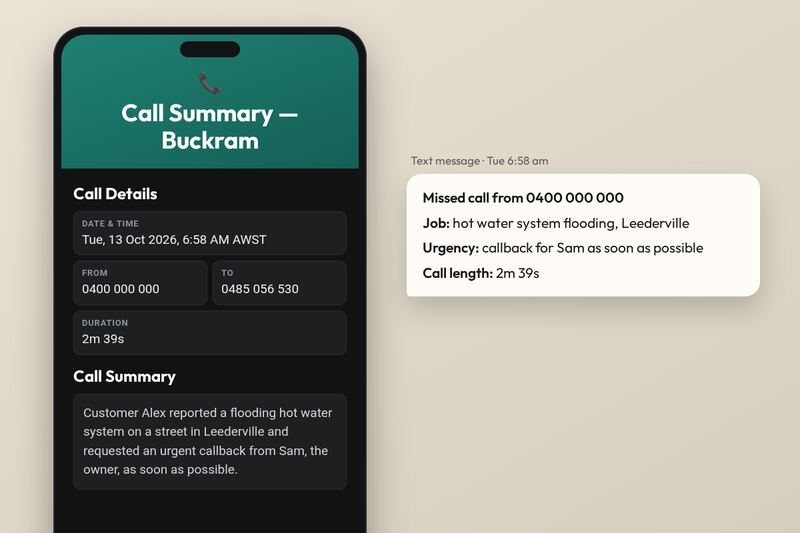
From a real demo call on our sample plumber line. Dummy caller number. Perth time.
The website and the answering go on the same Buckram invoice. You don't set up a separate answering account or put your card into someone else's checkout. Monthly answering and site care are billed in advance by card, in Australian dollars, GST not charged. Your part is short. Approve the script and the monthly answering line on the quote, pay the link we send with it, then set up one divert on your phone once we text you the number to send calls to.
We handle the rest. We build the assistant and write the script from the fact sheet you already sent us for the site. Then we load in your hours, your suburbs, the jobs you do and don't take, the emergency rules, and how you want to hear about new calls. We do a test call with you, and we fix the script whenever something comes out wrong. Ask for recordings any time you need them. You won't have to live in some vendor's portal.
Before any live calls, we sit down with you, in person or over the phone, and write the receptionist: a short script plus a list of facts it's allowed to use. You approve both. Nothing goes live on your number until you've heard a test call with your name, your hours and your kind of work.
It opens with your trading name. If it's true, it tells callers they've reached the after-hours or overflow line. Then it asks a handful of questions in an order that sounds like a person, not a form: who's calling, the best number if it's not the one they rang from, where they are, what's gone wrong or what they need done, and how urgent it is. If you've published call-out hours or a minimum charge, it can tell them. If you haven't, it takes the enquiry and leaves the quote to you.
The trading name, and how you say it on the phone. The number that should stay on the van and the site. Opening hours, and when you want every call to divert. Suburbs or regions you will travel to, and the ones you will not. The jobs you want, the jobs you will not take, and any licence numbers you want mentioned. How you like to be told about a new enquiry, text, email, or both. Anyone else in the business who should get a copy. Emergency rules for gas, flood, fire and medical. Words you never want used, including prices you have not approved.
Photos and your website copy help, because the receptionist should sound like the business the caller just looked up. Once it's live, we update the script whenever your business changes. That's part of looking after the site. You won't get a surprise invoice for swapping a suburb.